🎧 Sona Packers and Movers - Helpdesk & Support Center
Welcome to our dedicated Customer Support Center. At Sona Packers and Movers, we are committed to providing you with a safe, smooth, and hassle-free relocation experience.
If you have any concerns, complaints, or suggestions regarding your recent move, our automated ticketing system ensures that your voice is heard and your issues are resolved swiftly.
⚙️ How Our Support System Works
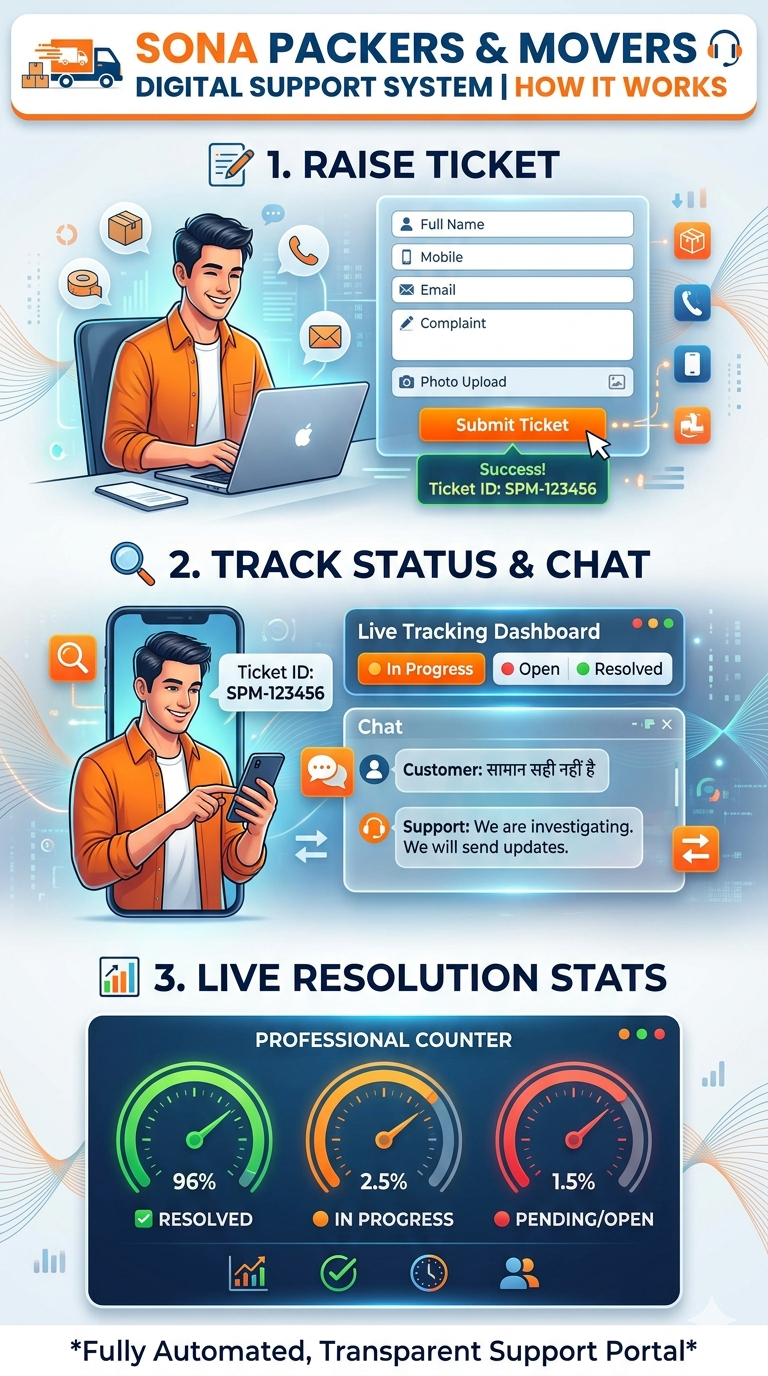
We have designed a highly transparent and responsive support portal to assist you. Here is a quick overview of our 3-step resolution process:
- 📝 Report: You submit your query or complaint along with visual proof (if any).
- 🔍 Track: Our system generates a unique Ticket ID (e.g., SPM-123456), allowing you to track the live status of your case.
- 💬 Communicate: You can chat directly with our backend support team through the portal until your issue is marked as Resolved.
🚀 Step-by-Step Guide: How to Raise a Ticket
Raising a ticket is quick and entirely digital. Just follow these simple steps under the "Raise Ticket" tab:
- Enter Your Details (👤): Fill in your Full Name, Mobile Number, and a valid Email ID. (We need this to send you real-time updates).
- Describe the Issue (✍️): In the "Complaint / Suggestion" box, clearly explain your problem. Include details like your booking date or moving locations for faster assistance.
- Upload Proof (📸 Optional): If you are reporting damaged goods or improper packing, use the "Upload Photo" button to attach an image straight from your gallery.
- Submit (✅): Click the "Submit Ticket" button.
What happens next?
Immediately after submission, our system will display a unique Ticket ID on your screen. You will also receive an automated confirmation email containing your ticket details for future reference.
🔍 How to Track Status & Reply to Admin
You don't need to call customer care repeatedly to know what's happening. You can check the live progress of your complaint at any time!
- Go to the "Ticket Status" tab on our portal.
- Enter your unique Ticket ID (e.g., SPM-458921) in the search box and click Check Status.
- Live Dashboard: Your dashboard will instantly load, displaying the current status of your ticket:
- 🔴 Open: We have received your query and will assign it to a team member shortly.
- 🟠 In Progress: Our team is actively investigating and working on a solution.
- 🟢 Resolved: The issue has been successfully addressed and closed.
- Two-Way Chat (💬): Scroll down to see the chat history. If our Admin team has asked for more details, or if you want to add further information, simply type in the "Write a reply..." box and click Send Reply.
🌟 Our Promise: We value your trust. Our live performance metrics at the bottom of the page reflect our dedication to resolving 100% of customer queries with complete transparency.